Building nishad.ai: A Static Website with a Terminal, an AI Persona, and a Markdown Blog
Static Markdown blog publishing: JSON frontmatter, draft validation and exclusion, permalinks, builds and GitHub Pages deployment, alongside nishad.ai's vanilla homepage and shared AI ontology.
On this page
I wanted a personal website that felt more like a tiny operating system than a resume trapped in a landing-page template. A terminal. A career framed as a commit graph. Alternate timelines clearly marked as fiction. Possibly too much neon.
The result is nishad://multiverse, served at nishad.ai. The surprisingly useful architectural decision was not adding a frontend framework.
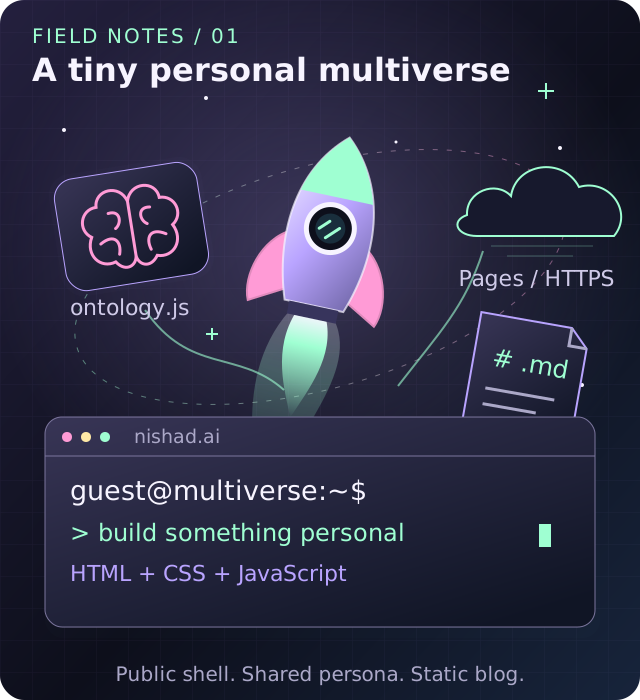
🚀 One small website, a whole personal multiverse. Original conceptual artwork, not a screenshot; the browser shell connects public facts, articles, and hosting.
This is a reconstruction of the current design from the source, not a claim that every component was written in this order. It explains how to run and extend the actual site, and how I would approach building the same foundation again. The companion analytics post covers the private backend added beside it.
🚀 Start with a static shell
The homepage lives in index.html: HTML, CSS, and an inline JavaScript module. There is no homepage bundler, client-side Markdown engine, or application server.
Its sections are Home, Story, Lore, Music, Work, and Terminal. Each view and tab has a data-view attribute. The router reveals one view at a time, updates active-tab state, and resolves URL hashes. Older anchors such as #timeline still reveal the section containing their target.
This keeps navigation shareable without requiring a server route for every tab. The mobile tab bar, command palette, and terminal commands are alternate entrances into the same page, not separate applications.
The browser shell imports ontology.js for public facts and connects to optional AI and separate Spotify modules. Markdown posts pass through scripts/build-site.mjs into _site/, alongside copied homepage assets, article HTML, a sitemap, a 404 page, and the public-page catalog. GitHub Actions publishes that static artifact to Pages. Private metrics live in separate VM services, not inside the public bundle.
The tradeoff is explicit: one large homepage file is easy to deploy but needs discipline to remain understandable. Separate data and integrations keep it from becoming the only place where every concern lives.
Make the terminal useful before making it intelligent
The shell is a browser UI, not a remote shell. Typing git status does not execute Git on a server. ls, cat, and pwd return deterministic site content.
The run(raw) dispatcher handles commands such as help, whoami, timeline, branches, blog, and navigation shortcuts. It also has history, keyboard navigation, clear, and deliberately silly commands. Output is appended as text rather than interpreted as arbitrary HTML.
That separation matters. A visitor should not need a model download or API round trip to open my blog or read a profile summary.
Unrecognized input goes to askAI(query, extra?). Fun commands like interview, branch, roast, and hype reuse that function with an additional mode instruction. The deterministic shell remains usable when AI is unavailable.
There is a small implementation trap for contributors: a local history variable holds terminal history. Browser navigation must use window.history, not accidentally call methods on that array. Similarly, UI tests must reveal the correct tab before trying to interact with its content.
🧠 Keep biography separate from behavior
ontology.js exports the public profile, career, education, skills, projects, awards, lore, and fictional branches. buildSystemPrompt() assembles those facts and the persona into the system prompt.
The editing rule is simple: change what the AI knows in ontology.js; change interaction behavior in index.html.
This is not retrieval from private documents. It is a curated, public knowledge module checked into the repository. Real facts need accurate sources. Alternate career branches are fiction and are labeled accordingly. Private information does not belong there merely because a model might find it useful.
The same prompt builder feeds the general-chat backends. Model changes do not require three competing biographies. They do require respecting context limits: the local model uses a 2,048-token context window, so prompt size is a real budget, not an aesthetic preference.
⚡ Three AI routes, one important privacy distinction
Reading the current dispatcher is more reliable than repeating an old "local by default" description.
The actual routing priority is: an existing BYOK key, then the configured site proxy, then the local browser model when neither hosted path is active.
The currently configured keyless experience uses an owner-funded Cloudflare Worker proxy and GPT-4o. Its owner API credential is a Worker secret, never client-side JavaScript. The proxy implementation is separate in worker/ai-proxy.js, with message validation and limits. Hosting the frontend on Pages does not make hosted inference local.
The optional BYOK route sends requests directly from the browser to OpenAI. That code stores a visitor's key in browser localStorage, streams responses, and maintains a spend HUD. Browser storage is not a secret vault, and a client-side spend cap is best-effort; account-level budget controls remain necessary. In the proxy-enabled UI, visitors are not prompted to provide keys.
The local route lazily imports WebLLM and downloads SmolLM2-360M-Instruct weights on the first query. It requires WebGPU, tries an f16 build first, and has an f32 compatibility fallback. Inference runs in the browser, but the initial runtime and model download still require network access.
Local inference, direct hosted inference, and an owner-funded proxy have different data flows. They should not all be described as "nothing leaves your machine." Backend errors are displayed instead of pretending a response succeeded.
Spotify is another separate integration, with its own browser OAuth and consent boundaries. It is not a prerequisite for the site or blog. Its experimental AI-analysis path has unresolved Spotify policy prerequisites; I would not treat a working demo as permission for compliant live use.
Add publishing without rebuilding the homepage
The blog uses build-time dependencies, not browser-time dependencies. scripts/build-site.mjs parses Markdown with markdown-it and highlights code with highlight.js, then generates complete HTML.
Posts live in posts/. Their filenames become stable slugs:
posts/building-nishad-ai-from-scratch.md
  --> /blog/building-nishad-ai-from-scratch/
The canonical listing is /blog/. There is no second /blogs system to keep synchronized.
Metadata is JSON between --- lines, not YAML. To start a post, copy the existing template and use this shape:
{
  "title": "My next engineering note",
  "date": "2026-10-07",
  "description": "What I built and what I learned.",
  "tags": ["engineering", "static sites"],
  "draft": true
}
All five fields are required. The builder validates real calendar dates, lowercase kebab-case filenames, nonempty prose, and metadata types. It validates drafts too, then excludes them from article HTML, the index, sitemap, and deployment artifact. A public Git repository is still not private draft storage.
The layout provides the H1; the body begins with paragraphs and ## sections. Heading anchors and a table of contents are generated automatically. Published posts sort newest first, with slug order breaking date ties. A future date is not a scheduler: draft: false publishes at the next deployment.
Raw HTML is escaped. Unsafe URL schemes are not rendered as links. Known code languages get highlighting; unknown fences remain escaped text. JavaScript adds copy controls, but the article, headings, navigation, and code are readable without it.
There is no hand-maintained post index. Renaming a published Markdown file changes its permalink, so choose the filename as carefully as a public API.
Run the actual project locally
With Node 22 or newer and Python 3 installed, a clean checkout can use the documented commands:
npm ci
npm run preview
Preview builds _site/ and serves it at http://127.0.0.1:8000. Use HTTP rather than opening index.html through file://; modules and browser integrations need an appropriate origin.
Preview is not a watch mode. After editing, rebuild with npm run build and refresh, or restart preview. Edit source Markdown and assets, never generated _site/ files.
For the blog's relevant checks:
npm run test:syntax
npm run test:blog
The full npm test also exercises existing homepage and integration behavior with mocked network requests. Browser fixtures build into a separate temporary test site. They are not production analytics or paid API calls.
This lets me add a post without migrating the entire homepage to a framework or introducing a CMS backend.
Publish through Actions, not a pile of copied HTML
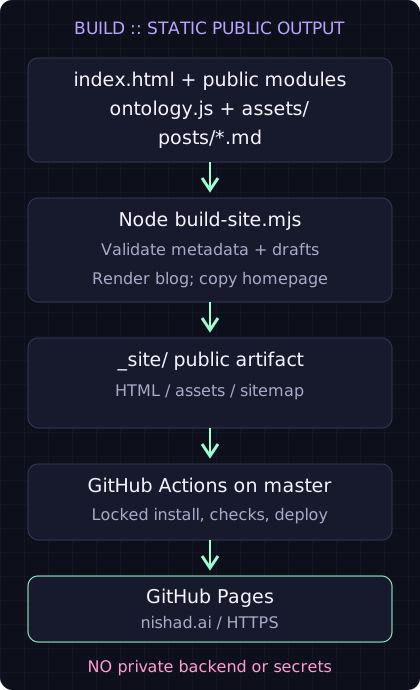
Figure: the current publishing pipeline. The opening illustration introduces the components; this flow shows how public files reach the web.
.github/workflows/pages.yml builds with Node 22, installs locked dependencies, checks syntax and Node tests, builds _site/, and uploads the Pages artifact. Pull requests validate; master publishes.
The repository's Pages source must be GitHub Actions. The older "deploy from branch root" setting would serve repository files instead of running the blog generator.
CNAME pins nishad.ai. The custom-domain setup points the apex to Pages and www to the GitHub Pages hostname, with HTTPS enabled. Adding an article does not require changing DNS.
The output uses an explicit public-file copy list. It includes the homepage, public modules and assets, generated blog, sitemap, 404, and integration launcher. It does not ship source posts, development dependencies, Worker source, or the private Go dashboard.
My release checklist is about the actual result: did the workflow succeed, does the blog index list the post, and does its exact canonical permalink return the new article? A successful local Markdown parse is necessary, but it is not proof that the internet has the page.
❤️ Extend the boundary, not the bundle
The metrics feature follows the same principle. deployment.js contains approved public integration URLs, and the public build emits a launcher and page catalog. Authentication, collection, PostgreSQL, and private reports live in separate services on the VM.
The analytics build diary explains consent, daily browser estimates, retention, GitHub owner authorization, and why the latency chart is server timing rather than page-load RUM.
The guiding idea is not "never use a backend." It is make each backend earn its existence, and keep its responsibilities explicit. Static content stays static. Personality stays in a public data module. AI backends disclose their data flow. Private reports stay behind real authorization.
The terminal can pretend my career is a Git repository. The architecture does not have to pretend everything is the same trust boundary.