Inside the nishad.ai Terminal: A Self-Hosted AI Shell with Gemma 4
An implementable high-level design of the browser shell, knowledge pipeline, Gemma 4 inference stack, streaming gateway, security boundary, MLOps workflow, and future RAG path behind nishad.ai.
On this page
The Terminal tab on nishad.ai looks like a tiny Unix shell that wandered into a neon multiverse. It understands ls, git log, and conspiracy; it can also answer questions about my work. Underneath, it is neither a real Linux login nor a wrapper around one magical API.
It is a deliberately layered system. The architecture described here has since moved to Qwen3-4B through llama.cpp on the Mac. The browser routing, gateway contracts, streaming rules, and fallback design remain relevant; the current implementation is documented in Running nishad.ai on a MacBook: llama.cpp, a Python Gateway, and a Browser Fallback.
The production path at the time of this article was:
- a static browser application classifies commands;
- a curated JavaScript ontology supplies facts and personality;
- a Cloudflare Worker preserves chat streaming and completed report contracts;
- a tunnel reaches a loopback-only Python gateway on my Mac;
- Ollama runs Gemma 4 locally;
- Server-Sent Events stream tokens back to the browser;
- OpenAI is an explicit, temporary override—not the default;
- a small WebGPU model is the last-resort browser fallback.
This post also preserves the earlier Azure ARM64 + llama.cpp production revision as an architecture and operations retrospective. The browser routing, ontology, security-boundary, streaming, and fallback lessons still apply; runtime-specific sections are labeled below. No private credentials, owner addresses, or management endpoints are included.
Production update — 17 October 2026: the live route is now Browser → Cloudflare Worker → authenticated tunnel → Python gateway → llama.cpp/Qwen on Mac. The Ollama/Gemma and Azure/Caddy sections below document earlier deployed revisions.
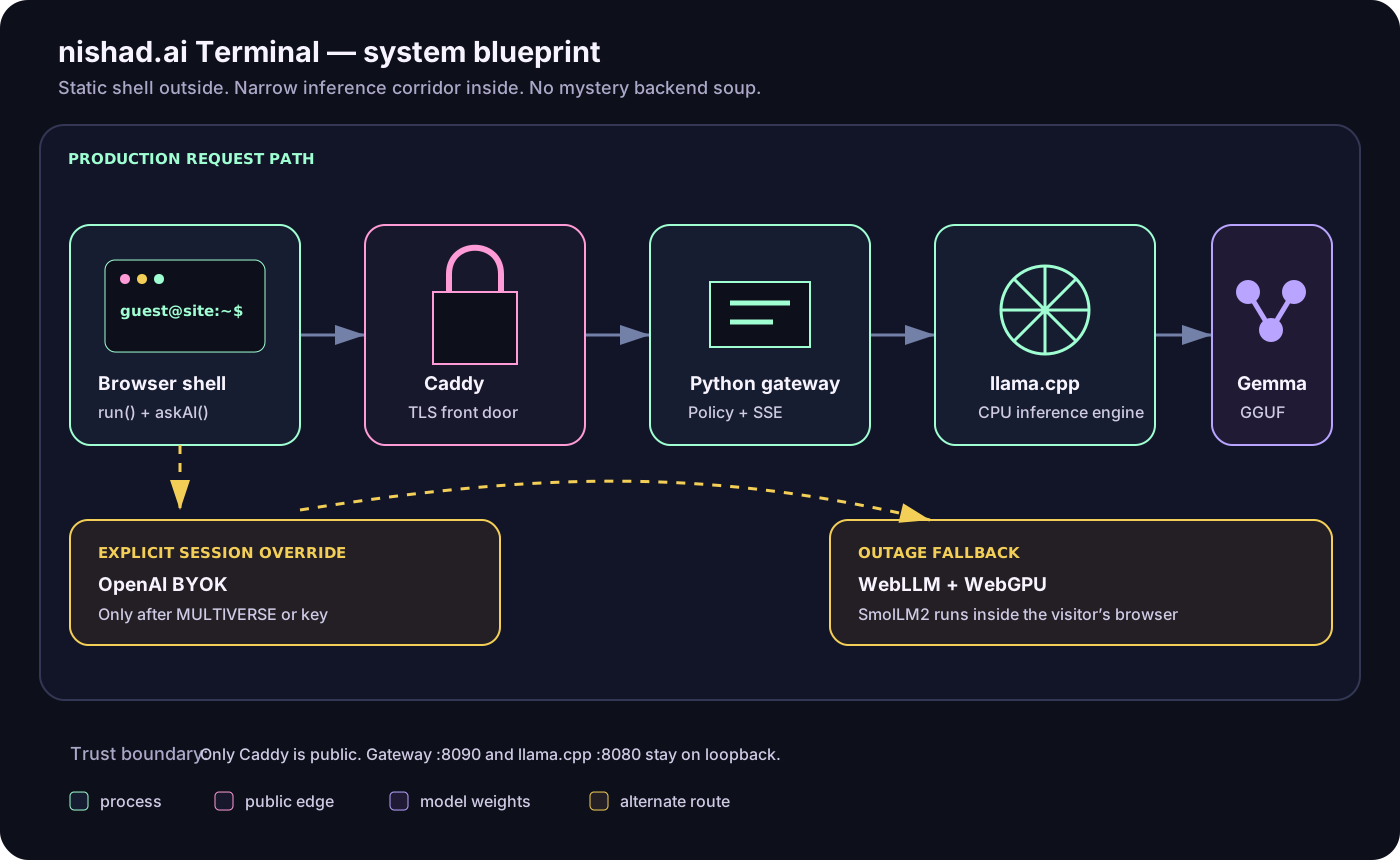
The whole machine: one static shell, one default self-hosted route, and two deliberate escape hatches. No actual foxes are on call.
Previous production revision: the Azure/llama.cpp mental model
If you remember only one diagram, remember this chain:
Browser → Caddy → Python gateway → llama.cpp → Gemma GGUF
Each box has one job.
| Component | Plain-English responsibility |
|---|---|
| Browser shell | Decide whether input is a built-in command or an AI question; draw streamed output. |
| Caddy | Be the public HTTPS front door and reverse proxy. |
| Python gateway | Validate requests, enforce origin and quota policy, and translate the stream. |
| llama.cpp | Load and execute the model efficiently on the CPU. |
| Gemma GGUF | Hold the learned model weights—the actual “brain” data. |
The public website itself remains static on GitHub Pages. GitHub Pages serves HTML, CSS, JavaScript, and generated articles; it does not run the model.
What happens when I press Enter?
The Terminal is an input box plus JavaScript. There is no hidden SSH session.
The function named run() receives the submitted text and checks a list of known commands. Commands such as help, pwd, timeline, git status, and cat about.txt are deterministic: the browser already knows the response and renders it immediately.
Anything that is not a known command becomes an AI question and goes to askAI().
askAI() sounds mysterious, but it is only a traffic controller. It does not contain a model and does not write answers. Its job is to choose which model route should handle the question:
- Use self-hosted Gemma by default.
- Use OpenAI only when the visitor explicitly activates it with
MULTIVERSEorkeyin that page session. - If the selected remote route fails, try the browser-local WebGPU model.
A remembered OpenAI key does not silently take over after refresh. Every new page load returns to Gemma. This matters for predictable cost, privacy, and debugging.
The relevant functions in index.html are intentionally small in concept:
run(raw)classifies terminal input.askAI(query, extra?)chooses a model route.proxyAskAI()calls the self-hosted gateway and paints incoming tokens.hostedAskAI()calls OpenAI when explicitly enabled.ensureEngine()lazily downloads and boots the browser model.
In simplified pseudocode:
if (isKnownShellCommand(input)) {
  runInBrowser(input);
} else {
  await askAI(input);
}
The real code also serializes requests with an aiBusy flag. While one answer is generating, the input is disabled. That prevents accidental concurrency from one tab and makes the busy state recoverable after success or failure.
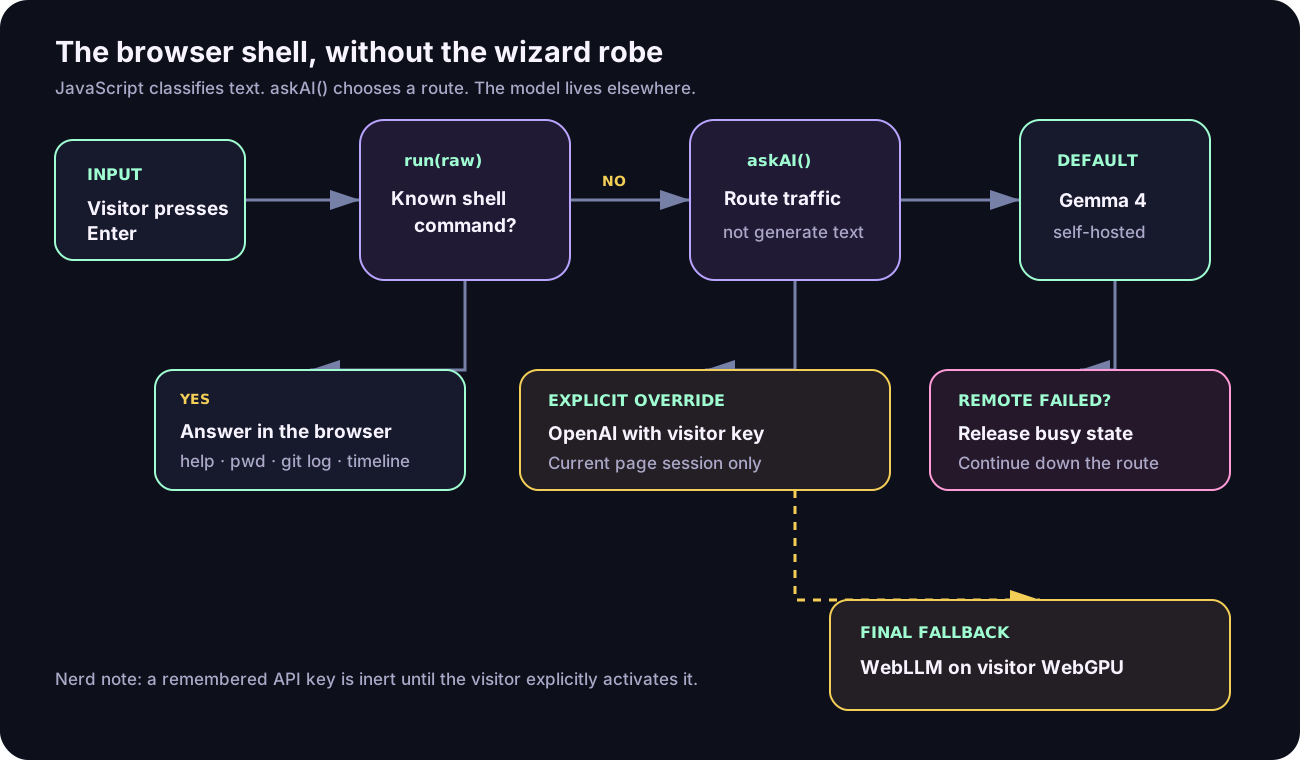
askAI() is the signpost, not the spaceship.
Where the Terminal gets its facts
The model does not crawl my website, read the repository at request time, or search every Markdown file. The central knowledge source is ontology.js.
That file exports structured JavaScript objects for profile, career, education, skills, projects, awards, fictional branches, lore, and persona. Its buildSystemPrompt() function turns those objects into one instruction string. For each AI question, the browser sends two messages:
[
  { "role": "system", "content": "persona plus structured facts" },
  { "role": "user", "content": "the visitor's question" }
]
This is prompt assembly, not Retrieval-Augmented Generation. The entire curated ontology travels with the question, subject to request and context limits.
What about the Markdown files?
Markdown powers a separate publishing pipeline:
posts/*.mdcontains blog articles and JSON frontmatter.scripts/build-site.mjsvalidates those files.- Markdown is safely rendered into static HTML under
_site/blog/. - GitHub Pages publishes the generated site.
Those articles are not automatically injected into Gemma. The model knows a fact only if it is already in its pretrained weights, appears in ontology.js, or appears in the visitor’s current request.
This separation is useful. A public article can be long and narrative; the ontology can stay compact, factual, testable, and explicit about fictional branches.
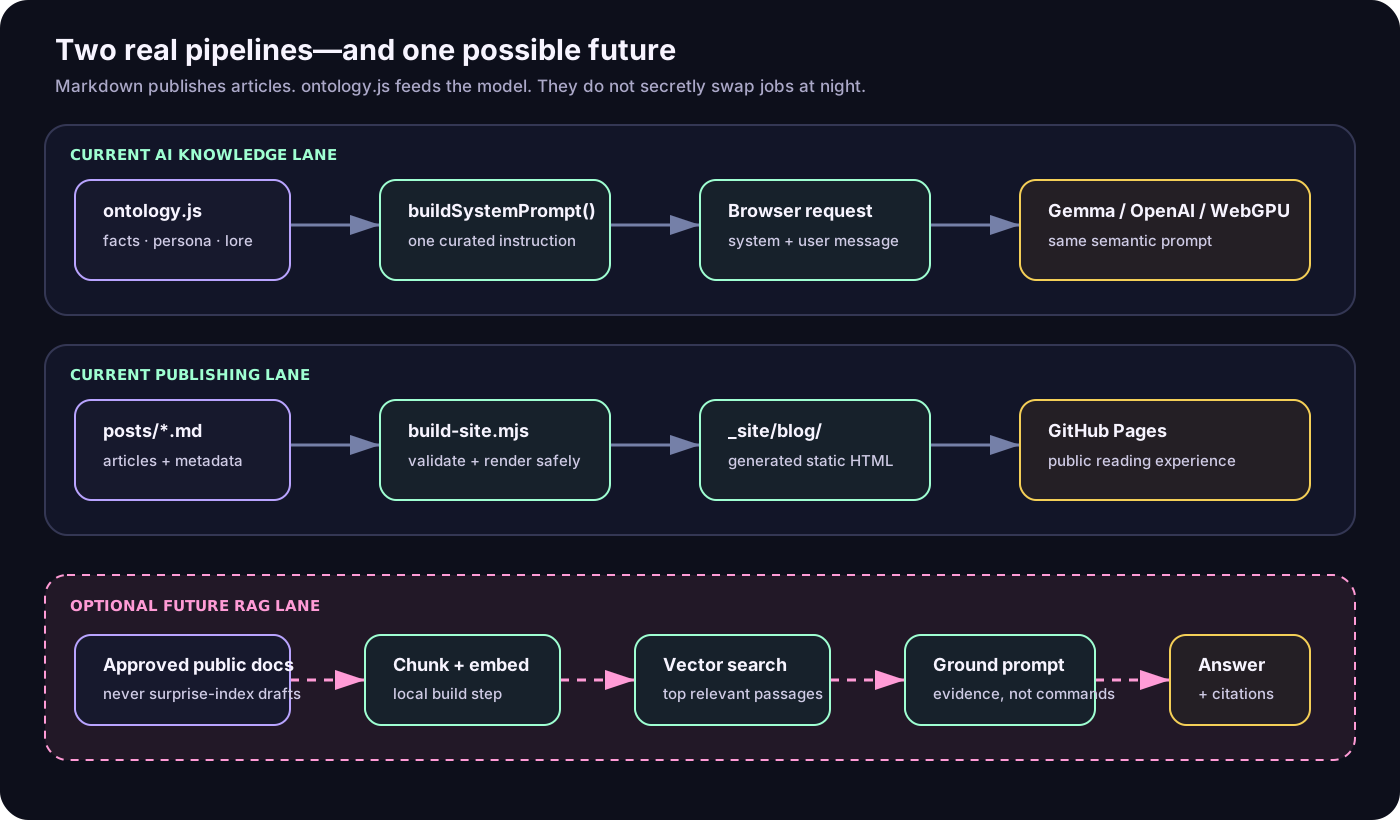
Two pipelines enter; only one becomes model context. Markdown is not secretly doing RAG in a trench coat.
Does RAG improve fidelity?
Potentially—when the corpus becomes larger than a carefully curated prompt.
RAG retrieves relevant passages before generation. A future question such as “What tradeoffs did you make in the private analytics collector?” could search approved articles, select the best passages, and give them to Gemma with source links.
RAG would improve:
- coverage across many long articles and project notes;
- freshness without expanding one giant prompt;
- exact citations and source links;
- detailed answers about material omitted from the ontology;
- evidence-aware refusal when nothing relevant is found.
It would not automatically improve reasoning. Bad chunks, weak embeddings, irrelevant retrieval, stale documents, or prompt injection inside indexed text can reduce fidelity. RAG also adds latency and operational components.
For the current small profile, direct prompt assembly is the better tradeoff: simpler, faster, deterministic, and easy to audit. I would add RAG when the approved corpus grows to dozens of substantial documents or when citations become a product requirement.
A safe future design would index only explicitly approved public files at build time, use a local embedding model, store vectors on the inference host, retrieve a small number of passages, label them as untrusted evidence, and require source citations. Private drafts should never enter the index by accident.
Gemma is the brain; llama.cpp is the engine
A model file cannot serve itself. The Gemma GGUF artifact is a large collection of learned numbers. It has no HTTP listener, process supervisor, tokenizer service, or streaming protocol.
llama.cpp is the native C/C++ inference runtime that makes those weights usable. It:
- opens the GGUF file;
- tokenizes the system prompt and question;
- executes the neural-network layers;
- samples the next token repeatedly;
- maintains the context and reusable prompt prefix;
- exposes an OpenAI-compatible local HTTP server;
- streams generated tokens to the gateway.
Why use it here instead of a large Python/PyTorch serving stack?
- It is excellent at CPU inference for quantized GGUF models.
- It compiles natively for ARM64.
- It supports memory mapping, prompt caching, streaming, server mode, and health checks.
- It keeps dependencies and resident overhead relatively small.
- It allows the model server to bind only to loopback.
The production runtime is compiled with native ARM64 CPU features, including vector and integer operations detected for the host. The model is loaded with memory mapping plus memory locking so its pages remain resident instead of being surprised by disk during a request.
Model card, in operational terms
| Setting | Current value | Why it matters |
|---|---|---|
| Model | Gemma 4 26B-A4B instruction-tuned | The selected open-weight text model; A4B identifies the active-parameter design in the model name. |
| Artifact | QAT Q4 GGUF, about 14.4 GB | Four-bit quantization makes CPU serving practical at some quality cost. |
| Vision | Not loaded | The Terminal is text-only; loading a projector would consume memory without helping. |
| Context | 4,096 tokens | Budget shared by instructions, ontology, question, and answer. |
| Chat output cap | 768 tokens | Enough for normal prose; a clear notice appears if generation ends for length. |
| Reasoning mode | Off | Avoids hidden deliberation consuming latency and output budget. |
| Parallel slots | 1 | Protects latency and memory on this CPU host; extra visitors queue. |
| Temperature | 0.75 | Allows personality without maximizing randomness. |
The host is an Azure Standard_E8ps_v6: 8 ARM64 vCPUs, 64 GiB RAM, and a 128 GB Premium SSD. The published Linux PAYG compute rate observed during deployment was $0.369/hour; disk, bandwidth, tax, and public-IP pricing are separate. The first choice was cheaper Spot capacity, but repeated allocation attempts for the preferred high-memory E-series shapes failed. Modern GPU-family quota was also unavailable, so the design chose an allocatable CPU host instead of pretending a GPU existed.
Measured generation is roughly 19 tokens per second after prompt evaluation. This is not a claim of GPT-4o equivalence. It is a cost-bounded personal-site model with measured behavior.
Caddy: the HTTPS front door
Caddy is a web server and reverse proxy. Visitors connect to it over HTTPS; they never connect directly to llama.cpp.
Caddy automatically obtains and renews TLS certificates, redirects HTTP to HTTPS, limits request bodies, adds security headers, removes unnecessary server-identification headers, and forwards traffic to the gateway on loopback.
Why have both Caddy and the Python gateway?
- Caddy owns public networking and TLS.
- The gateway understands application rules: allowed origins, message shape, quotas, and stream translation.
- llama.cpp owns inference.
Combining all three responsibilities into one process would make every future change riskier. The current boundaries let the model stay private even though the service is public.
The externally reachable surface is ports 80 and 443. SSH is separately restricted for operations. The gateway listens on 127.0.0.1:8090; llama.cpp listens on 127.0.0.1:8080. External checks confirmed that 8080 and 8090 are not publicly reachable.
One request, token by token
The browser sends a bounded JSON body to Caddy. Caddy forwards it to the Python gateway. The gateway performs four checks before inference:
- Is the browser origin approved?
- Is the body no larger than 32 KiB?
- Are there one to four
systemorusermessages with bounded text? - Are the visitor and global daily counters below their limits?
The gateway then converts the request into the OpenAI-compatible format understood by llama.cpp. Ordinary chat uses streaming; structured music reports use one complete JSON response.
For chat, llama.cpp emits Server-Sent Events. The gateway parses only the content delta and finish reason, then emits a smaller SSE envelope. The browser reads the response with a ReadableStream and TextDecoder, appending each delta to the terminal line.
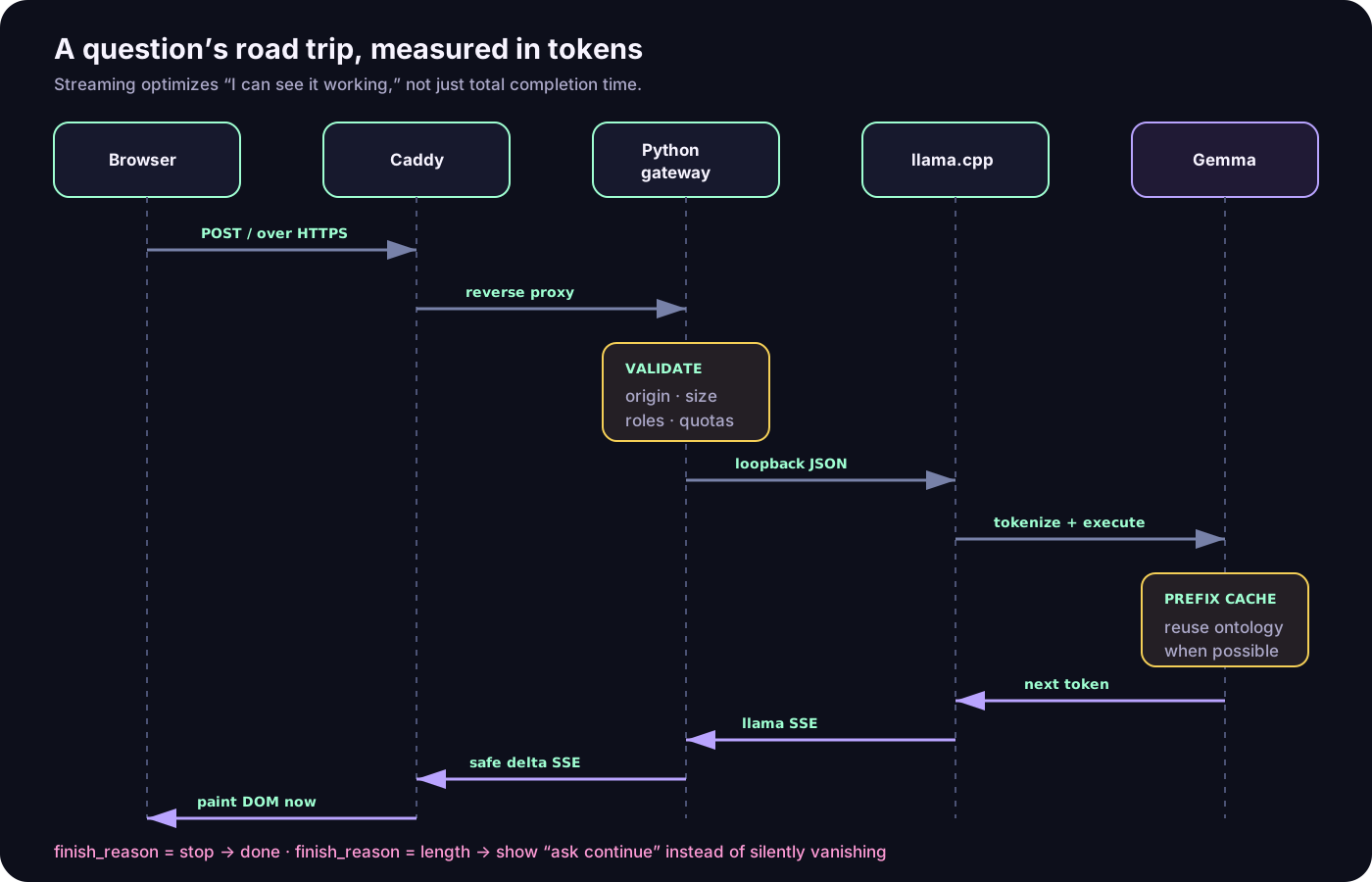
The answer is not teleported. It arrives as a polite parade of tokens.
Streaming changed perceived performance dramatically. Before streaming, the model could generate at a healthy rate while the browser stared at “thinking…” until the entire answer finished. After streaming, measured production first-visible text was about 1.3 seconds in the browser and about 0.8 seconds directly at the endpoint. A representative concise answer completed in about 7.9 seconds.
Longer answers naturally take longer. A production test requested roughly 300 words, displayed text progressively, reached its explicit end marker, and completed in about 24 seconds. If the model reaches the 768-token ceiling, the terminal now says so instead of silently stopping mid-sentence.
Security and privacy boundaries
The public gateway is deliberately narrow:
- only the production website origin is accepted;
- CORS preflight is explicit;
- request bodies and individual message lengths are bounded;
- only
systemanduserroles are accepted; - chat and report quotas are separate;
- upstream failures are reduced to safe error envelopes;
- prompts and generated text are not written to logs;
- logs contain bounded request status events;
- the model server and gateway are loopback-only;
- no model-management API is exposed to the browser.
The rate limits are currently in process memory: simple and cheap, but reset when the gateway restarts and do not coordinate across replicas. If traffic ever justifies multiple gateway instances, a durable Redis or edge-KV counter would be the next step.
The browser fallback has a different privacy shape. When Gemma is unavailable, WebLLM downloads SmolLM2-360M-Instruct and runs it on the visitor’s WebGPU. The prompt stays in the browser, but the model is much smaller and less capable. Fallback is resilience, not equivalence.
MLOps without pretending a personal site is a hyperscaler
There are two deployment planes.
Static application plane
Source changes go through syntax checks, unit tests, Playwright browser tests, and the static build. A push to master triggers GitHub Actions, generates _site, and deploys GitHub Pages.
The build validates every Markdown post—even drafts—escapes raw HTML, rejects unsafe links, generates the blog index and sitemap, and excludes the inference source directory from public output.
Model-serving plane
The inference VM uses four supervised pieces:
nishad-gemma.servicestartsllama-serverwith the model and CPU settings.nishad-gemma-warmup.servicewaits for health and evaluates the canonical ontology prefix.nishad-gemma-gateway.servicestarts the validating Python gateway after warmup.- Caddy serves the public TLS endpoint.
The warmup matters because most questions share the same system prompt. llama.cpp can reuse that common prefix rather than reevaluating the ontology from scratch. A cold representative request once spent roughly a minute before completion; the warm path plus streaming makes the first text visible in roughly a second under normal conditions.
Systemd restarts failed services, limits filesystem access, gives the model enough locked-memory allowance, and ensures the public gateway does not start before the model and warmup path are ready.
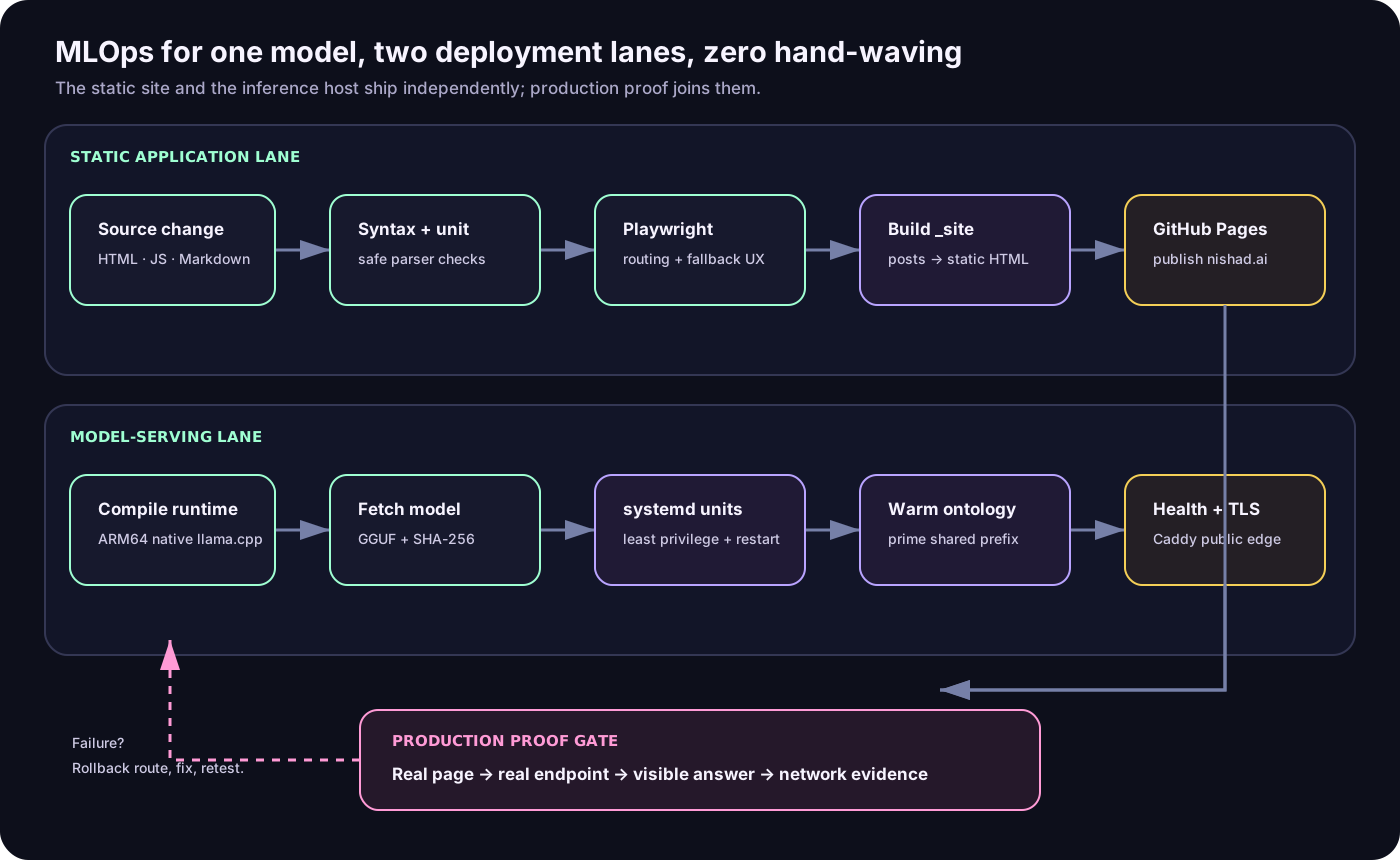
Two deployment lanes, one rule: never call it live until the real browser gets a real answer.
Verification layers
The implementation is tested at several boundaries:
- JavaScript and Python syntax;
- post metadata and safe Markdown rendering;
- gateway origin, body, role, quota, and failure behavior;
- deterministic commands and model routing in Playwright;
- explicit OpenAI activation and fallback;
- incremental streamed output and truncation notices;
- model checksum verification;
- systemd service health;
- external port isolation;
- live TLS, CORS rejection, JSON reports, and browser completions.
Mocked tests catch regressions; they do not prove production. The deployment gate includes a harmless prompt through the real nishad.ai page and inspection of the actual endpoint request.
Failure behavior is part of the design
| Failure | Intended behavior |
|---|---|
| Gemma gateway unavailable | Show the route change and try browser WebGPU. |
| Remembered OpenAI key exists | Ignore it until explicit activation in this page session. |
| Explicit OpenAI request fails | Fall back to Gemma, then WebGPU if needed. |
| Model returns empty content | Treat it as failure; do not present success. |
| Output ends for length | Keep the partial text and show a clear “ask continue” notice. |
| VM reboots | systemd reloads the model, warms the prompt, then starts the gateway. |
| Structured report is malformed | Reject it; never invent a valid report. |
| Too many requests | Return bounded quota errors instead of overloading inference. |
The old Cloudflare/OpenAI Worker remains in the repository as a tested rollback artifact, not the default path.
How to build the same pattern
A minimal implementation plan:
- Curate knowledge. Put stable facts in a typed or structured source rather than scattering them through UI strings.
- Separate commands from questions. Let deterministic commands remain deterministic; route only unknown input to inference.
- Choose a model that fits. Account for weights, context cache, runtime overhead, and concurrency—not just file size.
- Run the model privately. Bind the inference server to loopback and prove the port is externally closed.
- Add a narrow gateway. Validate origin, size, roles, timeouts, quotas, and response shape.
- Put TLS at the edge. Use Caddy, nginx, or an equivalent reverse proxy rather than teaching the model runtime to be your public security boundary.
- Stream immediately. Optimize time to first visible token, not merely total request time.
- Warm the shared prefix. Reuse stable system instructions when the runtime supports it.
- Supervise everything. Use systemd or an equivalent service manager with health checks and least privilege.
- Design fallbacks explicitly. A fallback should have documented quality, privacy, and cost properties.
- Test the real path. Require a production browser completion, not only mocked green checks.
- Measure before scaling. First-token latency, generation throughput, queue wait, finish reasons, and fallback rate tell you what to fix.
What I would improve next
The current design is intentionally small. Its sharpest limits are one active generation slot, CPU inference, in-memory quota counters, a functional rather than branded inference hostname, and no conversation memory.
My next steps would be:
- move the public endpoint to
ai.nishad.ai; - record privacy-safe aggregate first-token and queue latency;
- test two-slot or continuous batching under real load;
- move counters to durable storage if multiple replicas appear;
- evaluate a GPU only when quota, availability, and cost are real;
- add build-time, local-first RAG when the public corpus requires citations;
- automate model/runtime image baking and rollback.
Until then, the architecture does what a personal-site AI should do: remain understandable, measurable, replaceable, and just nerdy enough to make git log feel like a user interface.